
Hello, World!
It’s a classic programmer exercise. The point is to build a working development environment and a minimal program that does one thing: print out the words “Hello, World!”
Over the last 20 years, there’s been a shift.
Now the beginning exercise is often a todo list, because a simple, CRUD-based todo app is a step up from the “Hello, World!” exercise.
And frankly, in a world with LLM agent tooling, it’s something you can literally have built in less than an hour.
And yet, here I am, having spent years working on a simple todo app.
Why?
Building a simple product can be a surprisingly good way to practice complex skills.
Getting some working code isn’t where the complexity lies - it’s in building the right product.
I call it Cue. I use it every day, and have for years, so it clearly has value. It’s more than a toy, or an exercise. It’s much more than an AI agent would build in an hour.
In an ideal world, it would do all the things I want. But a clear product vision clarifies what problems it solves and doesn’t: Cue makes it easy for you to exercise judgement, plan, and execute, but does not make plans or decide for you. The vision also has lays out core concepts: early on, I decided side-by-side lists would be a defining model for using Cue.
Vision clarifies what problems will be solved; product management, design, and engineering are all about solving those with the proper tradeoffs. They make up the complex skill set that I get to learn and practice while building Cue.
I have to exercise product management, even though so far it only has one customer - me. But I experience the same challenge any product manager does - building something to solve the customer’s problem, even though the customer doesn’t always know the right way to do that.
Recently, I built out features for doing time block planning. It turned out to be an over-engineered disaster that made planning my days harder without adding any value. So I ripped it out and found I’m completely happy with a simple way to select multiple todos and drag and drop them.
I’ve learned to iterate until I figure it out. I built an implementation of the vision, with side by side lists. Then used it for a while to see what works, but also what gets on my nerves or confuses me. One early frustration was side by side lists on my phone, because they had to be scrolled horizontally. That’s fine, but it forced me to rethink how the sidebars worked (or didn’t). That cascaded into changes to how to initiate planning, finish planning, etc.
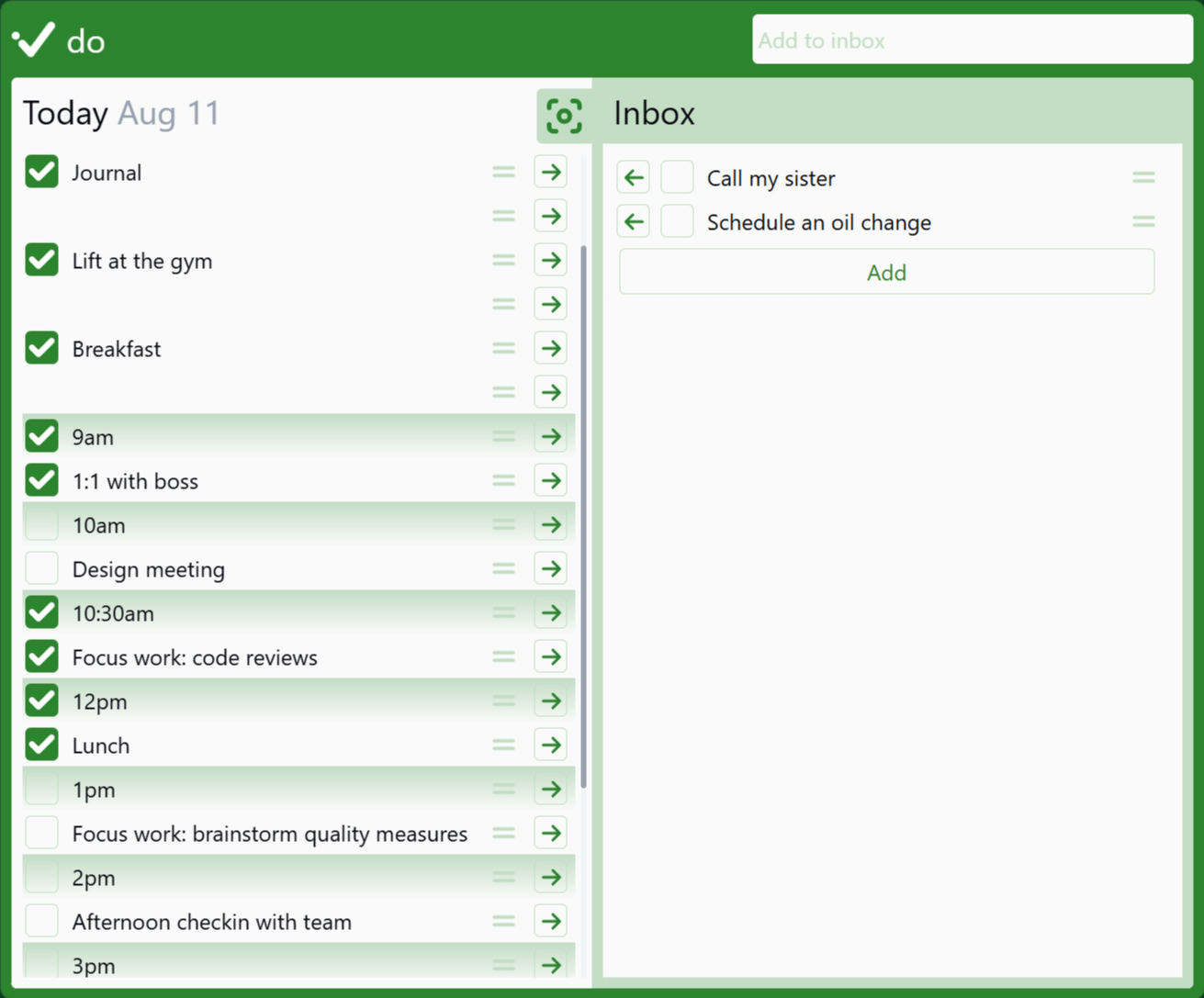
Those product decisions naturally led to design work and tradeoffs. Although this screenshot is showing pinned tasks, it’s fun to see all the other things that have changed.

Repeated daily use led to little changes that improved usability: the drag handle for todos has moved to the right, though you can also use the checkbox itself to drag them. The pinned state is now hidden behind a flyout menu, because it didn’t deserve to take up precious screen real estate (hint: click on the drag handle). I’ve gotten rid of a lot of the wasted border space. And I fixed that hideous green color.
Under the covers, I’ve also experimented with the underlying architecture. My first pass at Cue was built on Blockstack, back when everyone thought blockchains would be useful outside of finance. Then I rebuilt it using Google’s Firebase. Turns out it’s still around (I had to look it up). A while back, I switched to Ruby on Rails with Hotwire. More recently, it’s been fun to experiment with agents to build out new features, like dark mode, and see where they succeed, fail, or just need some extra hand-holding. Because Cue is both modest and useful, it’s a great way to experiment with different engineering approaches.
Now, having spent years on it so far, I know I’m going to keep plugging away at it. How? Well, next steps include:
- The public Cue code repository, with a proper open source license, and documentation
- More discussions of the vision, product, design and engineering behind Cue
- And of course, design updates and new features
Along the way, I’ve made product, design, and engineering decisions that took into account the user base - me - and may not work well for new users. Remember that flyout menu that’s shown when clicking the drag handle? Not exactly discoverable. But I am opening Cue up to anyone who wants to use it, for free. If you try it out, I’d love to hear what works, what’s confusing, and why you’re going back to your old system.
You see, I’ve been around the block when it comes to personal planning systems: Superself, Seven Habits, Getting Things Done, Timeblocking.
I firmly believe that personal planning systems always become “personal”: unique to you.
As I’m building Cue, I’m learning, and sharing what I learn and what I build. I hope it helps you build your own personal planning system.
And so, “Hello, World!”
Feel free to email me at rock@cueplan.com, if you want to say “Hello” back.